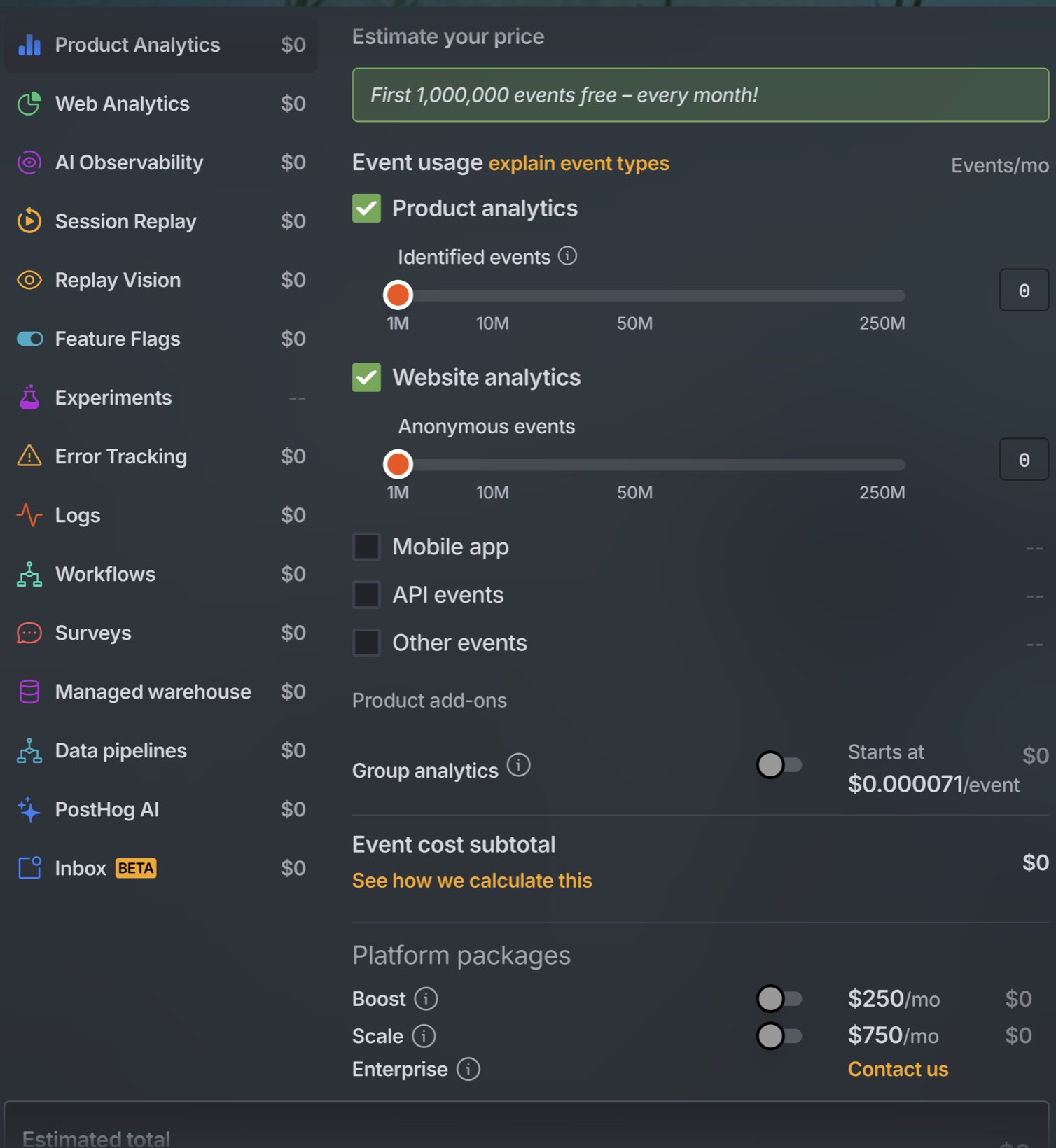
PostHog’s free tier is the most generous in this category and the company is straightforward about it. Their pricing page says more than 90% of companies use PostHog for free, and having done the arithmetic, that is believable rather than marketing.
This is not a piece about hidden costs. It is a piece about where the cliff is, because the cliff is in a different place from where most people assume, and the difference between a $0 bill and a $140 bill is one configuration setting.
What you get for nothing
Per month, checked August 2026:
| Product | Free allowance |
|---|---|
| Product analytics | 1,000,000 events |
| Web analytics | Billed together with product analytics |
| Session replay (web) | 5,000 recordings |
| Session replay (mobile) | 2,500 recordings |
| Feature flags | 1,000,000 requests |
No seat cost, no plan tier to buy first, and no credit card until you exceed something. Each product bills independently, so exceeding one does not start charging you for the others.
Where a million events actually lands
The number that matters is not your traffic, it is how many events each visitor generates. PostHog’s autocapture records pageviews, clicks, form submissions and input changes without you defining anything, which is a real convenience and also the thing that consumes the allowance.
A rough rule for a web app with autocapture on: 20 to 30 events per session. A marketing site with less interaction runs lower, maybe 5 to 10.
So:
| Product shape | Monthly events | Against 1M free |
|---|---|---|
| Marketing site, 100k pageviews | ~300k | Comfortable |
| App, 2,000 monthly active users, 4 sessions each | ~200k | Comfortable |
| App, 10,000 monthly active users, 4 sessions each | ~1,000,000 | At the line |
| App, 25,000 monthly active users, 4 sessions each | ~2,500,000 | Over |
Past the free million, the first paid band runs at $0.00005 per event. That is worth writing out in full, because the number of zeros makes it hard to feel: two million events a month costs $50. Rates step down as volume rises, reaching $0.000009 per event above 250 million.
Fifty dollars for double the free allowance is cheap. If events were the whole story, this article would end here.
The bill comes from session replay
A session recording is priced roughly a hundred times higher than an event, and the free allowance is proportionally much smaller. That combination is where the money is.
Web recordings past the free 5,000:
| Recordings per month | Rate |
|---|---|
| 5k to 15k | $0.0050 each |
| 15k to 50k | $0.0035 each |
| 50k to 150k | $0.0020 each |
| 150k to 500k | $0.0017 each |
| 500k+ | $0.0015 each |
Now take the same app: 10,000 monthly active users, four sessions each, so 40,000 sessions a month. Record all of them and the arithmetic is:
  5,000 recordings free                    $0.00
 10,000 recordings at $0.0050              $50.00
 25,000 recordings at $0.0035              $87.50
                                          -------
                                          $137.50
Plus $0 for events, because 1M is exactly the free line at that size.
So a product that was free last quarter is $137.50 a month this quarter, and the growth that caused it was a factor of five in users, not fifty. Mobile is more expensive again: $0.01 per recording after the first 2,500.
The setting that fixes it
Sampling. PostHog lets you record a percentage of sessions rather than all of them, and for the purpose replay actually serves, a sample is nearly as good as the whole.
At 10% sampling the same app records 4,000 sessions a month, which is inside the free allowance. The bill goes back to zero and you still have four thousand recordings, which is far more than anyone watches.
You can also record conditionally: only sessions where a feature flag is on, only sessions containing an error, only a specific URL. That is better than sampling because it keeps the recordings you would actually go looking for.
The reason this matters is that most people do not touch the default until a bill arrives. If you install PostHog today, set the sampling rate today.
Feature flags are the quiet one
A million flag requests a month sounds enormous until you notice what counts as a request. Every evaluation counts, and a single-page app that checks four flags on every route change generates them fast.
Ten thousand monthly active users, four sessions each, six route changes per session and four flags checked per change is 960,000 evaluations. That is the free allowance, from a product you probably think of as switched off.
The fix is the same shape as the replay one and it is a client-side setting: load flags once per session and cache them, rather than evaluating on every render. PostHog’s SDKs support this. It also makes your app faster, so there is no trade to weigh.
What this means for choosing PostHog
The honest summary is that PostHog is cheap for a long time and their claim about 90% of companies staying free is consistent with the arithmetic. For a bootstrapped product under 10,000 monthly active users with replay sampled, the bill genuinely is zero, and there is nothing else in this category that does as much for nothing.
Two things to know before you commit.
Usage-based pricing is less predictable than a flat price. Not more expensive, less predictable. A launch that goes well raises your bill in the same week it raises your traffic, and that is a different kind of exposure from a fixed $29 or $49 a month. Some people prefer it. It is worth knowing which you are.
It rewards configuration and punishes neglect. PostHog installed and left alone shows you a lot of autocaptured clicks that mean nothing. It is a platform, and platforms need someone to shape them. If nobody is going to do that, a smaller tool will serve you better and it is not close.
Where we come into it
We build Ripples, which overlaps with a narrow slice of PostHog and is not a replacement for it. We do not have session replay, heatmaps, feature flags or experiments, and we are not building them. What we do is join Google Ads spend, Stripe revenue and retention to the channel that brought each customer, and print the payback month, without any configuration.
PostHog has both halves of that. Revenue analytics reads Stripe, marketing analytics reads ad spend, and at the time of writing the marketing side is in beta and the two are not joined into a payback figure. A determined founder builds a version of it with cohorts and insights in an afternoon and maintains it afterwards. That is a real option and for some people it is the better one.
The full comparison, including where PostHog wins, is on the site. Running both is also common and sensible: PostHog for product behaviour and replay, us for acquisition and payback.
Sources
Rates checked August 2026 and subject to change. The arithmetic above assumes 25 events per session and 4 sessions per user per month, which is a reasonable middle for a web app with autocapture on. Substitute your own.