Analytics for founders

Every product you run, on one screen.

Where your users come from, who pays, who stays, and what each one cost you. Paste one line, read it yourself or hand it to your AI agent.

  • Connects
  • Stripe
  • Google Ads
  • Search Console
  • Bing Webmaster
  • Your site or app
Free until $1K MRREvery feature on every planWorks with your AI agent

Example portfolio, four products
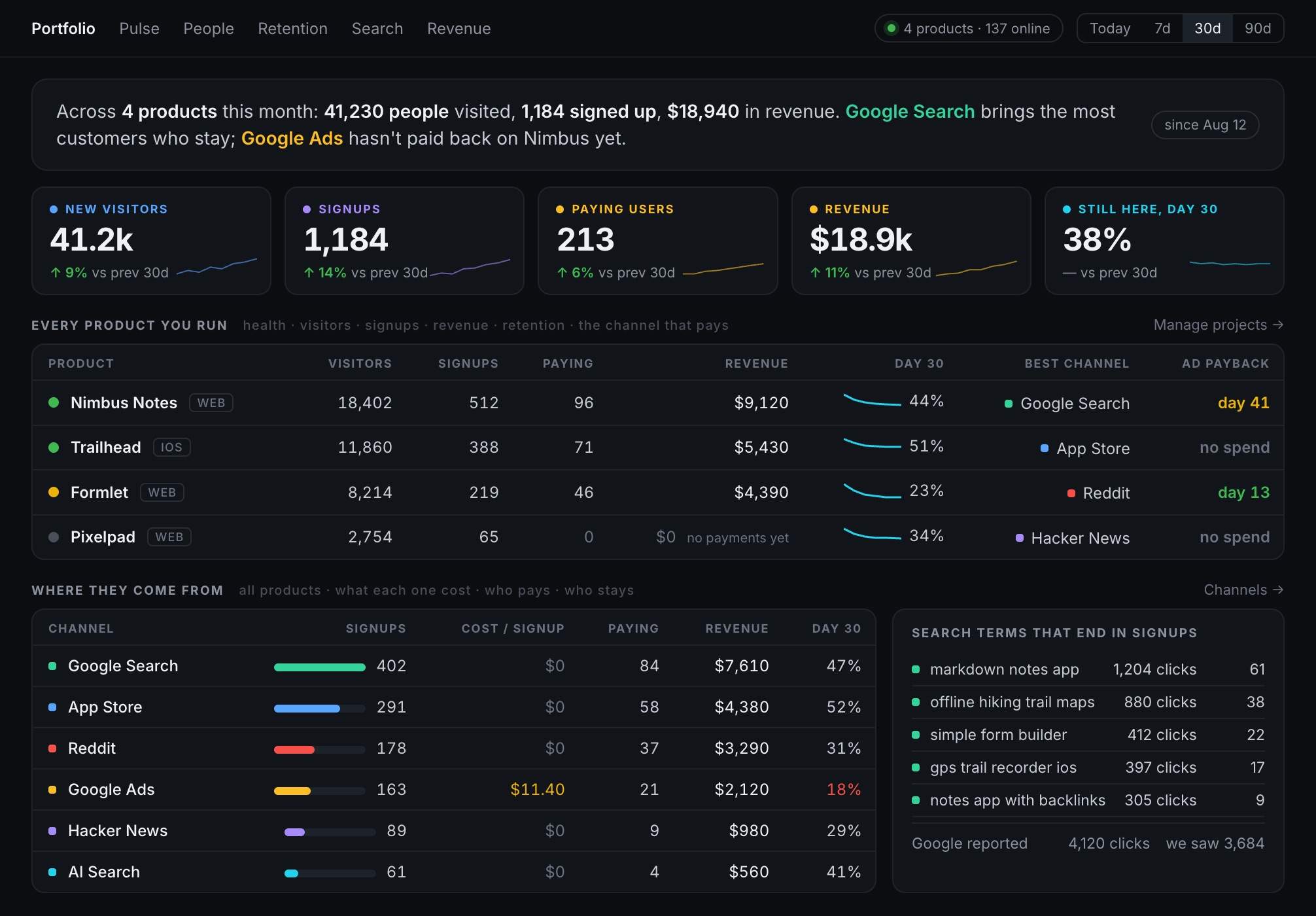
The Ripples Metrics portfolio screen: a plain-language summary across four products, scorecards for new visitors, signups, paying users, revenue and day-30 retention, a table with one row per product showing its best channel and ad payback day, and a channel table with cost per signup, paying users, revenue and retention, beside the search terms that ended in signups.

The problem

Your numbers live in three places that don't talk.

Stripe $2,847

Knows who paid.
Not where they came from.

Google Ads $1,204

Knows what you spent.
Not what it bought.

Analytics 8,431

Knows who visited.
Not which ones mattered.

“Which channel brings customers who actually pay and are still here in two months?”

Ripples is the one tool that holds all three at once: spend, revenue and retention against the channel that brought them.

Payback

Every other tool stops on day one.

Return on ad spend example project
break even day 13 day 41 day 0 day 60
Still active, by channel same three channels
100% Reddit 60% Twitter/X 21% Google Ads 9% day 0 day 30 day 60

Reddit retains 60% and pays back on day 13. Google Ads retains 9% and never does.

ROAS is a snapshot.

Return measured on the day of the click, then reported as if it were the answer.

Churn eats the return.

A customer who pays $29 and leaves in month two did not pay back your ad spend.

So payback is a retention number.

Ripples splits retention cohorts by the channel that brought each customer. That join is the product.

What you see

Four things you never had to configure.

Where they actually came from

Not just “organic” and “direct”.

Visitors by source, last 7 days
Hacker News 312
Reddit 189
Organic search 112
Twitter/X 71

Tuesday's spike was a Hacker News thread. Ripples links you to it.

Are they signing up? Paying?

Pre-built. No event definitions, no funnel wizard.

This month
847 visited
14% of them signed up
119 signed up
24% of them paid
29 paid

Numbers a person can read

No sessions, no bounce rate, no DAU/MAU.

Top of your dashboard

This month 847 people visited, up 12%. 119 signed up. $2,847 in revenue. Hacker News sent 312 people.

Your first paymentBest day ever14 day streak

Three projects, one screen

So you know which one deserves your Saturday.

Your projects
My SaaS Tool $2,400 up 12%
Chrome Extension $340 flat
Telegram Bot $80 down 8%

How it works

Three steps, and the middle one is a paste.

  1. 1

    Create your project

    Sign in with Google, name the thing you are tracking, and copy your script tag. No credit card, and nothing to configure.

  2. 2

    Paste one line

    <script src="ripples.sh/abc123"></script>

    Any stack. Plain HTML, React, Next.js, Telegram Mini Apps. The same one line everywhere.

  3. 3

    Watch the first visit land

    Open your site in another tab and watch the counter tick. Real time, not "in a few hours".

Traffic quality

Did real people arrive?

You bought traffic from somewhere you do not fully trust. Ripples scores every visit for signs of automation, gives every visitor one verdict, and reads each campaign, source or channel in a sentence you can act on.

Crawlers and automated browsers are always out.
A browser that announces automation, or contradicts itself about what it is, never reaches your numbers. Neither does a robot that says who it is.
Nothing else is removed without you.
Suspect visitors and datacenter connections are switches, each with its cost printed beside it. History is never rewritten in either direction.
Paid clicks and signed-in users are never removed.
Bought traffic that looks automated is shown, not hidden. That is the question you were asking.

Every verdict comes with its reasons in plain language, and a visit that was removed stays visible for 30 days so you can check the work. How it decides

Traffic quality Campaign spring_push, last 30 days, 1,240 visitors

These visitors look automated or bought.

  • 52% were suspect or removed
  • 41% carry a peak score of 45 or more (everyone else: 1%)
  • 91% bounced after one page (everyone else: 54%)
Looks human
31% 386
Unusual
17% 214
Suspect
34% 417
Removed by your filters
18% 223

Outlined is counted. Filled was removed. The read is a summary of the numbers above and does not change what is counted.

One bought campaign against the rest of the project. The rest of this site's traffic reads as real people.

What Ripples connects to

One dashboard for traffic, revenue and ad payback.

Ripples Metrics (ripples.sh) is a web and product analytics tool for solo founders and small teams. You add a lightweight tracking script to your website or app, then optionally connect Google Ads and Stripe. Ripples brings traffic, signups, payments and ad spend into a single dashboard so you can see what is working, and when your marketing actually pays for itself.

Tracking script

A single <script> tag records pageviews, referrers, signups and custom events from your website, Telegram Mini App or native app. No cookies, no setup wizard.

Google Ads

Sign in with Google to connect your Google Ads account. Ripples imports your daily campaign spend through the Google Ads API and combines it with your revenue to show ROAS and payback per channel. Read-only. We never change your campaigns.

Stripe and friends

Link Stripe, Paddle, Polar or Lemon Squeezy to import payments and subscriptions. Ripples ties each payment back to the visit and channel that drove it, so you can see which sources produce paying customers rather than just clicks.

Custom billing

Rolled your own billing, or would rather not connect an account? Send a revenue event instead, one call per payment. Same attribution, same payback, same free plan. Nothing about Ripples assumes a particular payment provider.

How Ripples uses your Google Account data

Connecting Google Ads is entirely optional. When you choose to connect it, Ripples uses Google OAuth to ask for your permission, and requests read-only access to your Google Ads account (the https://www.googleapis.com/auth/adwords scope). Here is exactly what that means:

What we access
Read-only Google Ads reporting data: your campaign names, daily cost and spend, clicks, and impressions, plus the list of Google Ads accounts you manage so you can pick which one to connect.
Why we need it
To import your daily ad spend and match it against the revenue Ripples already tracks, so we can calculate your true ROAS and show how many days each campaign takes to pay back. This is the core payback feature of the product.
What we do with it
Spend data is stored securely and displayed only inside your own private Ripples dashboard. It is never shown to anyone else.
What we never do
We never create, edit, pause or delete your campaigns; never access your customer match or contact lists; and never sell, share, or use your Google data for advertising, training models, or any purpose other than showing you your own analytics. You can disconnect at any time, which stops all access.

Ripples' use of information received from Google APIs adheres to the Google API Services User Data Policy, including the Limited Use requirements. Full details are in our Privacy Policy.

Before you get excited

Ripples is not the right tool for everyone.

No session replay or heatmaps.
Use PostHog, or Microsoft Clarity, which is free.
No feature flags or A/B testing.
Use PostHog, Statsig or GrowthBook.
Not open source, not self-hostable.
Use Umami, Plausible, Matomo or Rybbit.
Not much use before you have revenue.
We connect spend to revenue. No revenue, no point, yet.

And past roughly $10K MRR you will outgrow us, which is fine. We will help you move. The full list

Pricing

You pay when it works.

Free until your project crosses $1K MRR. Then $9 a month for one project, or $19 for up to ten. Every plan has every feature.

Free $0 until $1K MRR
Solo $9/mo one project
Portfolio $19/mo up to ten projects
See what is in each plan

One line of code. Numbers in 30 seconds.

Free until $1K MRR. No credit card. Nothing gated.

Get started free