There is a real way to do this and it takes about an afternoon. There is also a reason almost nobody who does it ends up satisfied, and it is not a configuration mistake. Both halves are below, working method first.
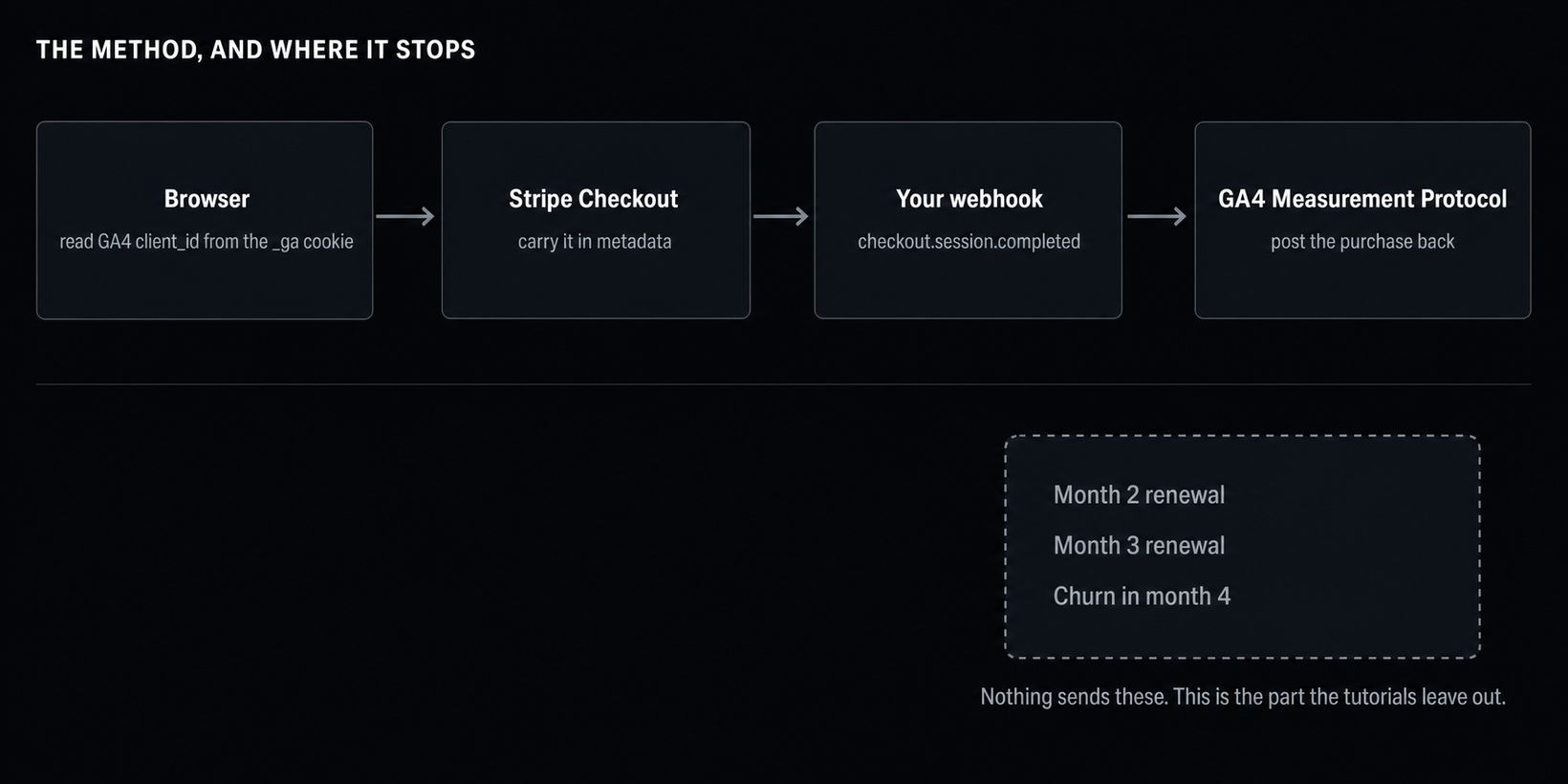
The short version: GA4 has no idea who your Stripe customers are, so you have to carry an identifier from the browser through checkout and post the purchase back yourself. Once you have, GA4 will show revenue by channel for the first payment and go quiet after that, which for a subscription business is most of the money.
The method
Step 1: get the GA4 client_id in the browser
GA4 identifies a browser with a client_id, stored in the _ga cookie. You need it at the moment someone starts checkout.
The reliable way is to ask gtag rather than parse the cookie yourself, because the cookie format has changed before:
gtag('get', 'G-XXXXXXXXXX', 'client_id', (clientId) => {
  // stash it somewhere your checkout call can reach
  window.__gaClientId = clientId;
});
If you need a fallback, the cookie value looks like GA1.1.1234567890.1234567890 and the client_id is the last two segments joined: 1234567890.1234567890.
Step 2: carry it into Stripe
Attach it when you create the Checkout Session, server side. client_reference_id is the obvious field, but metadata is more flexible if you also want to carry a UTM source or a session id:
const session = await stripe.checkout.sessions.create({
  mode: 'subscription',
  line_items: [{ price: 'price_123', quantity: 1 }],
  client_reference_id: gaClientId,
  metadata: {
    ga_client_id: gaClientId,
    utm_source: utmSource ?? '',
  },
  success_url: 'https://example.com/done',
});
One thing to do here that most guides skip: copy the same value onto the Stripe Customer object, not just the session. Subscription invoices in month two and beyond are not attached to a checkout session, so if the id only lives on the session you lose the thread after the first payment.
Step 3: post the purchase back from a webhook
Listen for checkout.session.completed for the first payment and invoice.paid for renewals. Then send a purchase event to the Measurement Protocol:
POST https://www.google-analytics.com/mp/collect
  ?measurement_id=G-XXXXXXXXXX
  &api_secret=YOUR_API_SECRET

{
  "client_id": "1234567890.1234567890",
  "events": [{
    "name": "purchase",
    "params": {
      "transaction_id": "in_1AbCdEf",
      "currency": "USD",
      "value": 29.00
    }
  }]
}
Generate the API secret under Admin, Data Streams, your stream, Measurement Protocol API secrets. transaction_id must be unique per payment or GA4 will deduplicate your renewals into nothing. Use the Stripe invoice id and you get idempotency for free when Stripe retries the webhook.
Refunds are a separate refund event with the same transaction_id. If you skip it, your revenue numbers drift upward forever.
There is a validation endpoint at /debug/mp/collect that returns the errors the live endpoint swallows. Use it. The live endpoint returns 204 for a payload it has entirely discarded.
That is the whole integration. Revenue now appears in GA4 under Monetisation, and you can break it down by session source.
Now the part nobody puts in the tutorial
You have wired it up correctly and it still will not answer “did Google Ads pay for itself”. Four reasons, in the order they will bite you.
The client_id is missing for a large slice of your traffic. It lives in a first-party cookie set by a Google script. Ad blockers, privacy browsers and anyone who declined your cookie banner will not have one. Those people can still buy. When they do, you have a purchase with no browser to attach it to, and GA4 either drops the event or files it under a fresh anonymous user with no acquisition history. Nobody reports what percentage this is, because by definition you cannot measure it with the tool that is missing it.
Renewals arrive outside every attribution window. GA4 attributes a conversion to a channel using a lookback window. The default for acquisition conversions is 90 days. Your customer signed up in March through a Reddit thread. Their eighth invoice pays in November. There is no attribution model in GA4 that connects November’s $29 to a March referral, so it lands as direct or unassigned. For a subscription product, that is not an edge case. It is the majority of lifetime revenue.
GA4 forgets. User-level and event-level data used by Explorations is retained for 14 months at most, and the default when you create a property is 2 months. Cohort work needs history by definition. You cannot ask a question in month 15 about people acquired in month 1, because those rows are gone.
There is no such thing as churn in GA4. GA4 models a purchase as a completed transaction. A subscription that ends is not an event it has a concept of, unless you invent one and fire it. Without churn there is no retention curve, without a retention curve there is no honest lifetime value, and without lifetime value there is no payback period. You end up with revenue-to-date by channel, which looks like the answer and is not, because a channel with great signups and 60% month-three churn reads identically to a good one for the first two months.
So what do people actually do
Three options, and all three are legitimate.
Accept the split. GA4 for traffic, Stripe or Baremetrics or ChartMogul for revenue, and a spreadsheet once a month where you reconcile the two by hand. This is what most founders under $10K MRR are doing, and for a while it is genuinely fine. It stops being fine when you start spending money on ads, because the reconciliation becomes the thing that decides your budget.
Build the join properly. Enable the free BigQuery export, land your Stripe data next to it with Fivetran or a script, and write the query yourself. This works, it is the most flexible answer, and it stays your job forever. Reasonable when someone is paid to do it. Expensive when that someone is you and the alternative is shipping features.
Use something that ships the join. This is what we built Ripples for, so read the rest with that in mind. Revenue comes from Stripe through the billing API rather than from an event you have to remember to fire, ad spend comes from the Google Ads API, and both are attributed to the first touch that brought each person rather than the session that happened to convert. Payback per channel and retention per channel are the default screen. It is free until $1K MRR and it takes one script tag. What it does not have is GA4’s breadth, BigQuery export, Smart Bidding integration or a free tier at ten million events. The honest comparison with GA4 is on the site.
If you would rather just do the arithmetic yourself, our CAC payback calculator is free and takes about a minute, and there is nothing to sign up for.
The one-line summary
Connecting Stripe to Google Analytics is a solved problem for the first payment and an unsolved one for every payment after it. If your product bills once, wire up the Measurement Protocol and you are done. If it bills monthly, understand before you start that you are instrumenting the smallest part of the revenue.
Sources
- GA4 Measurement Protocol reference
- GA4 data retention settings
- GA4 attribution and lookback windows
- Stripe Checkout Session API
- Ripples docs: Stripe integration
Checked August 2026.